


mstoetz1
-
Content Count
58 -
Joined
-
Last visited
Posts posted by mstoetz1
-
-
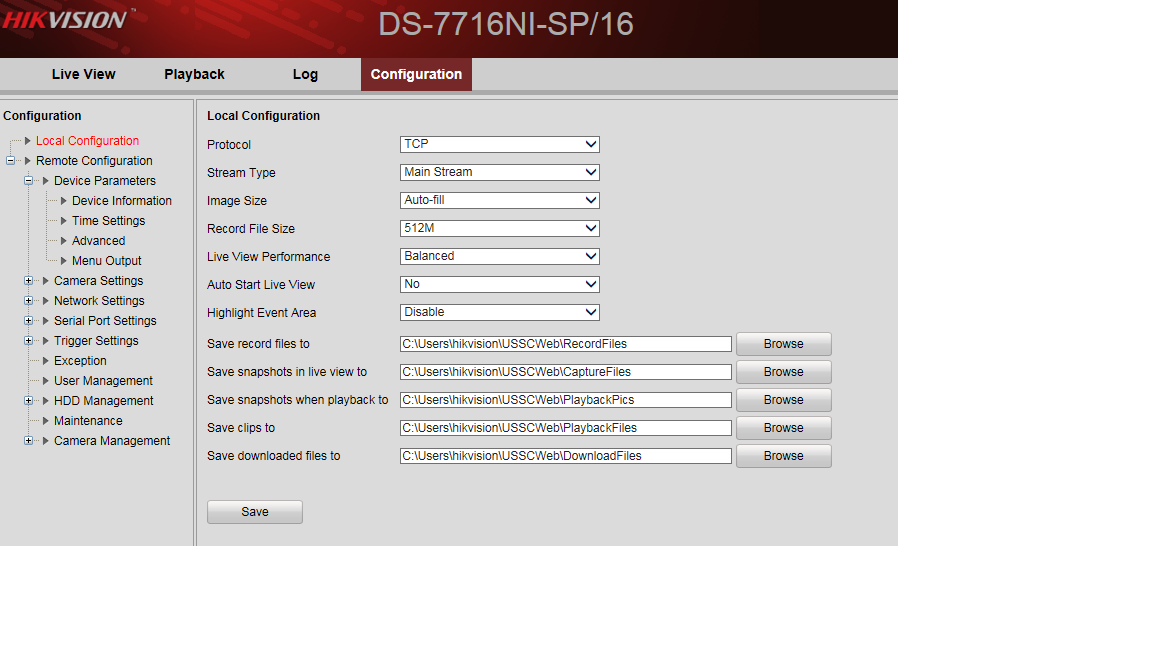
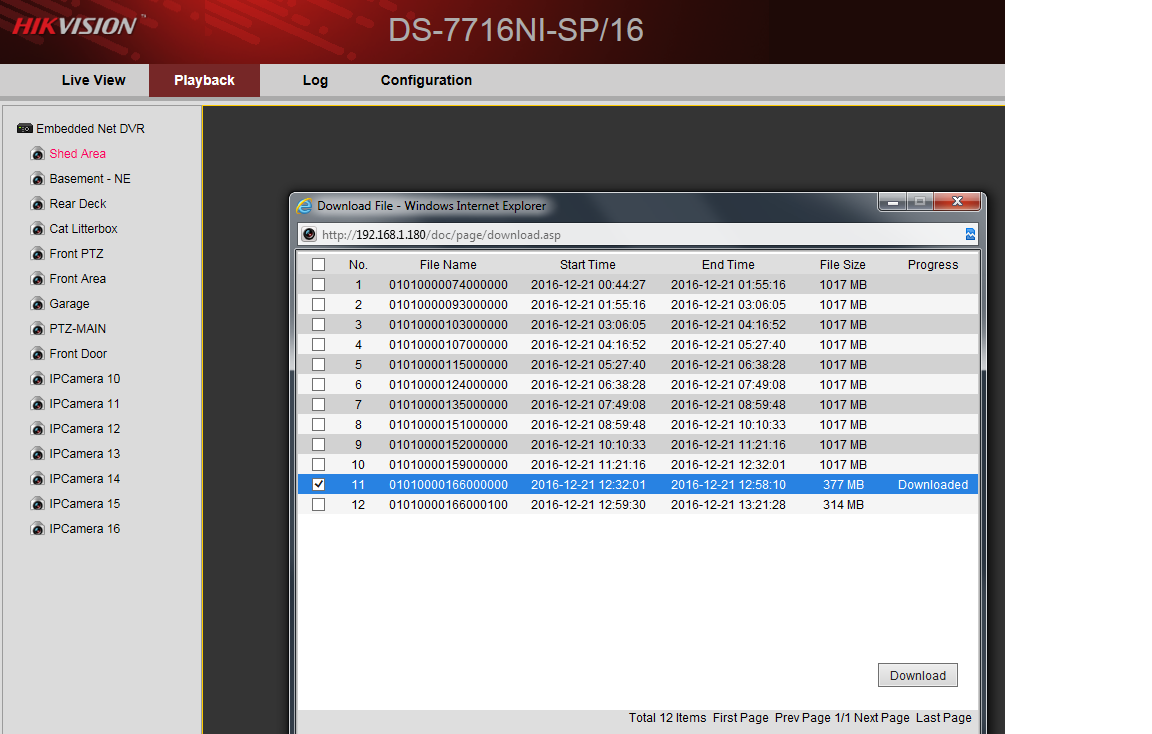
I have a Hikvision NVR (7716NI-SP/16) and am unable to download recorded video from it.
I have paths set for the videos, and select which one I want to download, but the videos never appear to be downloaded where I have the path set.
Paths:
Downloading file:
I created a user "hikvision" and created a path under that user in c:\Users\hikvision\USSCWeb
I've tried setting different paths all over, download says done.. and still no luck. I've searched for the file names.. no results.
This is driving me nuts.. any ideas?
-
I would buy from Newegg, CDW, or TD, regardless of what I decide on. I'm in SE Wisconsin.Here are a few snippets from Dahua reviews, of which I always take with a grain of salt, but with zero experience with any of these manufacturers, I'm basically stuck relying on them.
http://securityvulns.com/news/Dahua/DVR/1311.html
Search "dahua" at shodan (dot) io yourself to see all the devices out there: https://www.shodan.io/search?query=dahua[/code]
I won't address specific comments, but I will say my experiences with an DAHUA NVR5416-16P, is:
1) I was able to hardcoat IP's in both hikvision and Dahua cameras and connect them to the DAHUA NVR, also using a separate POE switch (not plugging them into the NVR POE).
2) With regards to the security vulnerabilities, I personally would never allow inbound traffic to mine (or any NVR for that matter) from the internet without specific firewall rules as to source IP (ie: only allow work IP's). I let my cameras email me if they detect motion etc, since this is outbound, its fine. I don't allow any incoming connections period to my internal network.
3) I've had no issues with snapshots with my NVR and mixture of DAHUA and Hikvision cameras.
4) No matter what you have, they all will have security vulnerabilities. All "internet of things" will probably have them too... but all the more important they can be updated with firmware when available (which is one reason why I would not purchase from china unless you want your english firmware to change to chinese or something weird.
As you said, I think we need to take past reviews with a grain of salt.
just my 2 cents.
-
Ok, after the last fiasco.. this item is only for local sale in the BC Lower Mainland.
Thanks
-
A word to those who decide to purchase via the classified ads on this forum:
First of all thank you to the owners of the forum for allowing this free service for private sales...
For buyers:
1) Do Your research before agreeing and finalizing a sale, and having the seller go to the work of paying for shipping (and print the label), box the stuff up, take pictures and send them to you.
2) There is a cost to using services like paypal to pay for things... so some things can't be reversed without some fees being paid to them.
3) I am sure that most if not all private sellers on here are honest people and want you to be happy with your purchase, but private sellers aren't stores... so don't expect us to have a return/refund policy like Walmart.
As one of those sellers with honest and good intentions, please don't waste my time unless you're serious and willing to follow through on an mutual agreement.
(I apologize to the moderators if this isn't an appropriate post. I am a bit irked this morning with a recent experience).
-
-
Still available
-
I don't know your NVR, but if it is like the other two hikvision NVR's I've done, you should be able to.
I've used two POE switches to power hikvision/Dahua megapixel cameras:
http://www.amazon.com/TP-LINK-TL-SF1008P-100Mbps-8-Port-802-3af/dp/B003CFATT2
http://www.amazon.com/NETGEAR-ProSAFE-JGS524PE-24-Port-JGS524PE-100NAS/dp/B00GG1ADLS
There are threads on here about POE switches.. my only concern, would be that the POE ports have enough power for the cameras and I'm not sure all work for this use (others may know).
Also, there are threads here that discuss configuring the hikvisions to work off a network switch.
-
This is why I personally would rather use a POE switch, and not bother with the integrated POE on the NVR.
We've done this recently on a DS-7604NI-SE/P and an DS-7716NI-SP/16. Seems to work ok.
-
The cameras are connected to POE ports on the NVR, I did think of this but I can't get the cameras to access the Internet while connected through the NVR. Does anyone know if there's a way to do this? I still want them to record to the NVAre your cameras connected to POE ports on your NVR? Or your NVR is without POE ports?
Oh, I actually use a POE switch for these, so they have a gateway to the internet as well as adding them to the NVR.
-
I have the motion detection and email working but just from the cameras (DS-2CD2532F-IWS) themselves.. which works well for me.
I used "advanced configuration/Basic Event/motion detection", select the area you want to monitor, click "send email".
Also on the "advanced configuration/Network/email(tab), I selected "attached image"
-
btw... I paid $600 USD from the HD Security Store (hdsecuritystore.com) in NY less than a year ago, and need to get $400 CDN for it (about $300 USD)
Data Sheet: http://www.dahuasecurity.com/download/20151023guvjuy.pdf
-
I ended up getting more hikvision cameras than Dahua.. and purchased a Hikvision NVR.
Therefore, I am selling my DAHUA NVR5416-16P NVR (USA version purchased from USA Authorized Dealer - HD Security Store.com). Still have box, and all accessories. (and comes with new firmware). This DAHUA NVR was purchased within the year so is fairly new.
I'm in the BC lower mainland if anyone is interested. Please let me know.. thanks!
-
btw.. I would make sure you don't have too old of firmware for the HDB3200 camera. Mine are US models, and are using this firmware:
General_IPC-HX3(2)XXX_Eng_N_V2.420.0000.0.R.20140414.bin
Software Version2.420.0000.0.R, build : 2014-04-14
WEB Version3.2.1.183358
ONVIF Version2.4.1
-
I have the same model NVR and run some DAHUA cameras:
You do need to assign a static IP to the camera, after that plug it back into the NVR and add the IP manually to the NVR.
Steps:
1. Plug the camera to you router/switch (not into the back of the NVR).
Also you need to power the camera. (if it is not a poe switch)
2. Run a computer/laptop on the same network.
3. Download this configuration tool and run it. You'll see the camera's IP showing up there.
4. Double click the IP and modify it to: 192.168.254.100, default
gateway: 192.168.254.1
5. Plug the camera to the NVR.
6. Add the camera's IP manually with these settings:
Protocol: ONVIF
Address: 192.168.254.100
Username: admin
Password: admin
You need to do this for all the cameras that are a different brand from the NVR (Hikvision).
-
Some new videos:Hikvision DS-2CD4A85F-IZS:
Hikvision pinhole camera WDR test:
Love the clarity on the 4K cameras.. too bad they are so expensive compared to 1080p.. the pinhole is good too.
-
Did you get your question answered? I am looking at buying a 7608ni but want to make sure it will work. I am putting 4 cameras in a house. 4 in a garage. And connecting the house to garage via a wireless bridge.I want to make sure the NVR will see all cameras and function properly
Thanks
Bill
Hi, yes we did. The suggestions were correct. We just had to enter the camera IP's manually.
I really like the Hikvision NVR.. and at some point would like to trade my Dahua in for a Hikvision.
-
Videos from Hikvision Darkfighter PTZ Ds-2DF8223I-AELcBeGdQkU_mc
Tj6__iVy8sM
Edxqdt80Hm4
I love the autotracking... what are those animals? foxes? or coyotes?
-
Dahua is always terrible next to Hikvision in complete darkness. Your images are typical of any of either manufacturer's models.I wish I had known this prior to spending about $1500 on Dahua cameras. I'm turfing my new 16ch Dahua NVR5416-16P NVR as well since I've decided to go all Hikvision.
-
Comparison between two similar cameras, one Hikvision, and one Dahua.
Models:
Hikvision: DS-2CD2332-I
DAHUA HDW4300C
I'm really disappointed in DAHUA in this test. The Hikvision is so much clearer at night.


-
Thank you everyone for your help and responses
-
But why would you want to view it directly from the cameras. Most nvr has direct access the configuration of the cameras.Thanks for the reply.. we actually didn't want to view direct. It was because it was easier to run all the network cables to the garage for all cameras and just run one network cable to where the NVR is, in the livingroom of the house. I didn't want 8 cables running to the NVR just for esthetic reasons (since we ran the cable on the outside of the house)
We have standalone POE switch in the garage.
-
A friend just purchased a Hikvision NVR (DS-7608NI-SE/P 8 ) and wanted to connect cameras to it via its LAN network rather than run all 8 cameras through the walls (and 8 cables) and connect to its 8 POE ports on the back.
It was easier to put a separate POE switch in the garage and run all cameras to the switch out there and just one one cable back to the NVR inside the house.
However, this model appears to lock the use of 8 cameras only to its POE ports and not let you use the LAN.
Please let me know how can get the NVR to find and use the cameras on the LAN instead of just the internal POE ports?
Thank you!
-
You will be happy with a Dahua NVR. There software works great with Chrome and IE (newest versions)This will only work on a PC running Chrome not a Mac, correct?
I think you had to add exceptions in chrome to get it working on the PC (to run plugins).. or at least I had to.
I haven't able to get it working on a mac with chrome, or any browser (unless you use parallels).
But what does work not bad, is SmartPSS on the mac.. if you can manage it crashing when you "Quit SmartPSS". (I'm running the latest mac os).
SmartPSS even will monitor both Hikvision and Dahua cameras... which surprised me.
What I didn't expect when moving to this NVR (in my experiences), and IP cameras, is you need a beefy PC to watch the cameras.
(even watching one camera directly (not using the nvr) on a core2duo uses most of the cpu).
My new Macbook i7/16gb even gets slow sometimes with just 4 or 5 cameras on it. I think I need to add a new PC laptop to my IP camera upgrade with a cost of 1K to 2k.
Anyways.. those are my experiences.
-
First Sample:
SD6C230S-HN PTZ ( Amazing clear pictures in darkness )
Second sample:
DAHUA HDW4300C - Night snapshot with Default settings ( Not all that clear/ I prefer the Hikvision below over this one)
Also I could only get the snapshot for this one in 4:3 ratio?
Third Sample:
Hikvision DS-2CD2032-I - Night snapshot with Default settings (not too bad actually)


Hikvision NVR - Can't download recorded videos
in Digital Video Recorders
Posted
Bingo.. thank you!